How do I send a parcel via Parcel Machine?
Tips
26 November 2023
Sending parcels at a Parcel Machine is child's play and very intuitive! You can choose from several convenient options to send your parcel to your chosen Parcel Machine, Parcel Point or door-to-door delivery. Choose the shipment method that suits you best!
Method No. 1 - InPost Mobile App
Picking up and sending parcels is even easier with our InPost Mobile app. You can send a parcel there without printing a label, pick up a parcel remotely, extend the parcel collection time and redirect it to where you want it. The useful functionalities are also appreciated by others - as evidenced by the fact that InPost application Mobile has several million users!
How do I send a parcel in the app? You will do it very quickly and conveniently by following the steps below:
- First of all, pack your parcel and make sure it is properly secured. Measure the size of your shipment and choose a box that is the right size for your package.
- In the InPost Mobile app, select the central icon with the "Send" arrow.
- Select the type of shipment and shipment size that corresponds to the size of your parcel. Fill in the recipient and sender details. Then select the parcel machine where you want your parcel to be delivered.
- Pay for your shipment. After completing the necessary details, you will be redirected to convenient payment methods. Once payment is complete, a 9-digit shipping code and QR code will appear in the app.
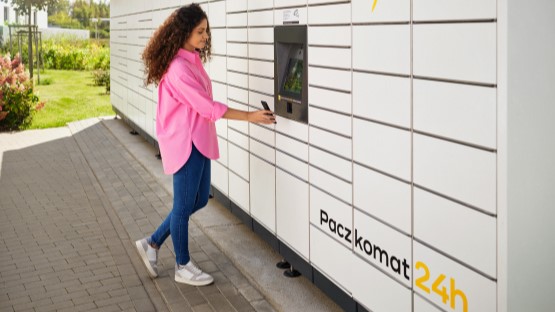
- Time to send your parcel! With the app you will do it expressly and without having to print a label. Go to any Parcel Machine or Parcel Point. If you are sending via Parcel Post (or Appkomat), you can do it remotely! On your smartphone, click the "Open box remotely" button. Alternatively, you can scan the QR code in the Parcel Machine's scanner or enter the sending code on its screen. To do this, select the option "I have a sending code or a return code". You will find both codes in the details of the parcel you are sending in InPost Mobile. Once you have completed the selected sending option, the box will open automatically. Place the parcel in it and you're done!
Don't have our app yet? Time to change that! Download it free of charge now and enjoy all the features! Use only verified mobile app shops:
You can do more with InPost Mobile!
 Download InPost Mobile
Discover what our app can do – remote parcel pickup, extending pickup time, redirecting parcels, and so much more. Sounds good?
With the InPost Mobile app, you have everything close at hand.
Mode 2 - Fast Track
Another way is to send a parcel via the InPost Quick Shipment service. You do not need to log in or create an account. How to get started?
- Go to www.inpost.pl/SzybkieNadania/ and choose the option of collecting the parcel: by Parcel Machine, Parcel Post or delivery by courier. Fill in your details and those of the recipient.
- After completing the necessary details, you will be redirected to the eCard payment page. Select your preferred payment method, pay, then print a label and stick it on your properly secured parcel. Remember that you can download the label as a PDF and print it wherever it is convenient for you.
- With your parcel ready, go to any Parcel Machine or Parcel Point. If you prefer to send by Parcel Machine, select the option "I already have a parcel with a special label" on the machine screen. Then scan the barcode from the label and place the parcel in the box. You can also enter a collection code. If you are sending at a Parcel Post, deliver the prepared parcel there. That's all!


Mode 3 - Parcel Manager
The third way is to send parcels using Parcel Manager. If you don't already have an account with it, it's worth setting one up! It only takes a few moments and costs nothing. It allows you to send your parcels in a very simple way. See how to do it:
- Log in to the Parcel Manager via the inpost.co.uk website (Log in > Parcel Manager) or directly https://manager.paczkomaty.pl .
- In the "Send parcels" section you will generate a special label. Fill it in - choose the option of collecting the parcel you are sending - by Parcel Machine, Parcel Post or courier (the Manager will tell you the cost of sending the parcel itself). Then pay for the shipment using the funds available in your account in the Manager. Finally, print out the label.
- Prepare the parcel - ensure that the parcel is properly secured and stick the pre-printed label on the parcel.
- Now all that's left is to send your parcel! Do it at the Parcel Machine or Parcel Point of your choice.
- At the machine, scan the parcel number or enter the tracking code from the label. Place the parcel in the box. And you're done!
You already know how to send a parcel via Parcel Machine with or without a label. Choose the best way and remember that the fastest way to do it is with InPost Mobile!
Czytaj również