 WhatsApp
 Messenger


Talk naturally
Use simple sentences and communicate in a way that would be natural if you were talking to another person. Avoid complicated or overly technical expressions.
 Loading page, please wait...
 Listen to the text

A package in the shape of a cube with dimensions of:
A parcel in the shape of a cuboid or cube. In the case of a courier packages, the dimension of the longest side may not exceed 120 cm, and the sum of the dimensions may not exceed 220 cm.
A package which has one of the dimensions exceeding 120 cm or which has a sum of dimensions (length + width + height) longer than 220 cm. A non-standard package is also: a round, cylindrical, or oval shaped element or one with irregular shapes and/or with protruding elements. The non-standard package option does not apply to long packages.
Exceptions:
A package of small weight and large dimensions, for which the dimensional weight is greater than the actual weight of the package. Dimensional weight is calculated according to the following formula: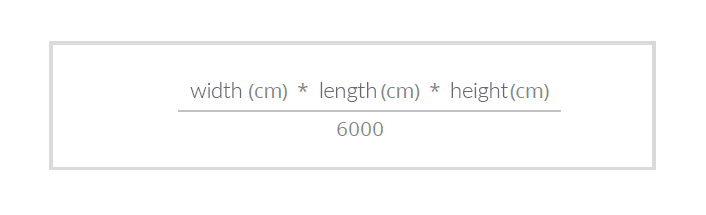
For example: 65 cm x 50 cm x 50 cm / 6000 = 27 kg
Surcharge for parcels over 50 kg of dimensional weight for each kilogram. The maximum dimensional weight for which shipments are priced may not exceed 70 kg. After exceeding this weight, the price for the Standard Palette service is charged.
A long package is one with length of the longest side exceeding 200 cm. The maximum actual weight of a single bundle or element may not exceed 30 kg. We calculate the price of a long package for each commenced meter of package length over 200 cm. The maximum length of a long package cannot exceed 350 cm.
When determining the weight, the rule is choosing the higher weight: actual, dimensional, or length-based. Dimensional, non-standard, and long packages are sent with separate waybills according to the principle: one package - one waybill.
Available 24/7

Our Virtual Assistant is available 24 hours a day, 7 days a week.
Chat with usAlso available on:

+48 722 444 000
+48 746 600 000
The cost of the call will be charged in accordance with your operator’s rates.
Monday – Friday 7:00–22:00
Saturday 8:00–20:00
Sunday 8:00–18:00
public holidays 8:00–16:00
For businesses

Fill in the form and receive an offer tailored to your business. Our adviser will draw up personalised terms of cooperation for you.
Request a quote
Having a problem with your parcel or wish to make a complaint? Please use the complaint form.
The damage report applies only to damaged parcels. Please complete it along with your complaint.
Complaints form Damage report
Monday – Friday 7:00–22:00
Saturday 8:00–20:00
Sunday 8:00–18:00

Compliance Officer: Arleta Adamus
Data Protection Officer: Anna Jaworska - Kłosowicz
Press Officer:
Wojciech Kądziołka
pr&# 64;inpost.pl

Oh, that's not good 😥 You can report a broken Parcel Locker using the form https://inpost.pl/en/zglos-awarie or via chat. Remember that you can send your parcel at any Parcel Locker device.

All is not lost! Try to operate the Parcel Locker remotely using the InPost Mobile application. You can also scan the QR code or barcode to collect or send the parcel. You can generate the QR code yourself at: https://qr.inpost.pl/

Get the pickup code, check your SMS, e-mail or InPost Mobile Application notifications. Send you a message again? VoiceBot MAT will do it for you!

If you are still at the Paczkomat® device and 15 minutes have passed since collecting the parcels ⌛, you can reopen your locker using the same pickup code or the InPost Mobile application. If 15 minutes have already passed, contact our hotline while you are at the machine. The consultant will help with remote collection.

The locker was closed without placing the package? No problem! VoiceBot MAT will allow you to try sending the package again. If your shipment is too large, try repacking it. Remember that when sending a parcel using the Quick Returns service, you can change its size at https://szybkiezwroty.pl/en/change-size.

If the message appears in the application several times, make sure you have location and Internet data turned on. If the locker doesn't open, check if you have the latest version of the app. If you don't have any updates available, try restarting your phone. If the error still appears, collect the parcel by scanning the QR code or entering the pickup code on the Paczkomat screen.

Is your return code invalid? Make sure it is 10 digits long and has not expired. Then introduce it slowly again. Has your refund code expired? Using the website https://szybkiezwroty.pl/en or the Mobile Application, you will generate a new one. If this is not possible, contact the store.

The shipment is too large and you can't repack it? Have you given up sending your parcel? Using the contact form or MATa's ChatBot, you can request a refund for generating it. Remember that when sending a parcel using the Quick Returns service, you can change its size at https://szybkiezwroty.pl/en/change-size.

Check the location of the locker on the screen of the Paczkomat device or in the mobile application. Approach it and check if the door is not ajar. If not, try opening the vault again. If the box is still not opened, you can report it via the form https://inpost.pl/en/zglos-awarie or via chat .

Make sure you are at the correct Parcel Locker device. You may find it helpful to use the "Navigate" option available in the mobile application. Also check that you are entering the correct pickup code and phone number on the machine screen. You can also collect the parcel remotely from the mobile application or by scanning the QR code.

Use simple sentences and communicate in a way that would be natural if you were talking to another person. Avoid complicated or overly technical expressions.

When you talk with VoiceBot, you have two interaction options. You can use your voice to say a question or use your phone's keyboard.

It is important not to interrupt the MAT and give him a chance to answer your question or request. Wait until he has finished speaking before asking another question or giving an order.

You can write your own question or use ready-made suggestions such as: parcel status, courier number, InPost application, find Paczkomat, find PaczkoPunkt, what's new.

Use simple sentences and communicate in a way that would be natural if you were talking to another person. Avoid complicated or overly technical expressions.

It is important not to interrupt the MAT and give him a chance to answer your question or request. Wait until he has finished speaking before asking another question or giving an order.
You can talk to MAT on many channels. The choice is yours! ChatBot MAT is available on Messenger, WhatsApp, on InPost.pl and in the InPost Mobile app. You can also talk to it using Google Assistant on "Talk to InPost." VoiceBot MAT is available to customers when contacting the InPost hotline.
The charge is at the operator's rate.
Because this issue most likely required direct involvement of the Consultant.
It is not possible to disable MAT, however, if the need arises during the call you can connect directly to the Consultant.
When talking to the VoiceBot MAT, you can communicate by voice, saying the digits clearly. You can also enter the digits on the numeric keypad.
Yes, we maintain the same security standards as when talking to a Consultant.
Yes, conversations with MAT are recorded for security purposes. We inform you about this at the beginning of each conversation.
VoiceBot MAT only speaks Polish. ChatBot MAT talks in Polish, English and Ukrainian.
MAT is available 24 hours a day.
MAT was created with advanced technology, so it can provide answers to many questions and help solve many problems. However, its abilities are limited from access to knowledge and collected data.